
deveshshetty/sysadmin-game
We Taught an AI to Fix Broken Linux Servers (By Giving It Real Ones to Break)
Teaching AI to fix broken servers — with real Docker sandboxes, real rewards, and no fake judges
Table of Contents
- The Problem Nobody Talks About
- The Game
- Under the Hood: What Actually Runs
- The 10 Ways We Break a Server
- The Reward That Can't Lie
- How We Trained: Two Phases
- Training Results
- Before vs After: What the Model Actually Says
- What We Got Wrong (and Fixed)
- Why This Approach Scales
- Try It Yourself
1. The Problem Nobody Talks About
There's a moment every system administrator knows. It's 2am. Something has crashed. Customers are angry. You're staring at a terminal, and the only way out is to read errors, run the right commands in the right order, and not panic.
Senior admins do this in their sleep. They check the obvious things first. They read the log files instead of guessing. They don't type rm -rf / no matter how tempting.
Junior admins, and most AI assistants, don't. They fail. They suggest fixes before reading errors. They invent file paths that don't exist. Ask a chatbot to fix your broken web server and you'll get something that sounds plausible and doesn't work.
We wanted to fix that. So we built an AI a video game.
2. The Game
The setup is simple. We spin up a fresh Linux server inside an isolated sandbox. We deliberately break it. Maybe we corrupt the web server's config file. Maybe we fill the disk with junk. Maybe we change a file's owner so the service can't read it anymore.
Then we hand the AI a one-line complaint, like "nginx isn't responding on port 80," and a shell prompt. Same tools a real admin would have. The AI types a command, the server runs it, and the output comes back. The AI keeps going until it fixes the server, gives up, or hits a 25-command limit.
That's the whole game.
What makes it work is what happens at the end of each round. We don't ask another AI to grade the answer. We don't have a human read the transcript and decide if it was good. We just check whether the broken thing is fixed. Is the web server serving requests again? Yes or no. Is the disk under 90% full? Yes or no.
This sounds obvious but it's actually rare. Most AI training relies on judges that can be fooled, or human labels that can be argued with. A web server is either up or it's down. There's no negotiating with reality.
3. Under the Hood: What Actually Runs
Here's the architecture. Three layers, each doing one job.
┌─────────────────────────────────────────────────┐
│  The LLM  (Qwen2.5-Coder running on T4 GPU)     │
│  Reads complaint → generates one bash command   │
└──────────────────────┬──────────────────────────┘
                       │  HTTP  /reset  /step  /state
┌──────────────────────▼──────────────────────────┐
│  Our Environment Server  (FastAPI, port 8000)   │
│  Manages episodes, computes reward, enforces    │
│  safety — blocks rm -rf /, fork bombs, etc.     │
└──────────────────────┬──────────────────────────┘
                       │  docker exec
┌──────────────────────▼──────────────────────────┐
│  The Sandbox  (Ubuntu 22.04 + systemd in Docker)│
│  Real nginx, real apache, real disks, real certs│
│  Break it → run commands → check if fixed       │
└─────────────────────────────────────────────────┘
The LLM never touches the container directly. It only speaks to the HTTP server. The server translates that into docker commands, collects output, runs the fix check, and hands back a reward. Clean separation. No cheating.
Each episode starts with /reset — a fresh container, a fresh broken scenario, a fresh complaint. The LLM calls /step with one command at a time. At any point it can see its state via /state. When done: true comes back, the episode is over.
The whole thing is OpenEnv compliant, which means any external trainer — Colab, a cloud VM, a HuggingFace Space running a T4 — can connect to it over HTTP and run training without caring what's inside.
4. The 10 Ways We Break a Server
We wrote 10 scenarios. Each one is a Python file with two functions: break_system() and check_fixed(). Break runs at the start. Check runs after every command the AI sends.
Five of these are training scenarios. The other five are held out — the model never sees them during training. We evaluate on the held-out ones to check if it actually learned a general skill, not just memorized the answers.
5. The Reward That Can't Lie
Every command the AI sends gets scored. The math is straightforward:
+1.00  — check_fixed() returns True (the actual service works)
+0.10  — first time using a diagnostic command this episode
          (df, ss, systemctl status, journalctl, ps, cat, ls...)
-0.01  — per command issued (efficiency penalty)
-0.50  — destructive command detected → episode terminated
The diagnostic bonus is there for a reason. Without it, the model figures out that the fastest path to +1.0 is to try fixes blindly and hope one lands. That's not a sysadmin skill, that's guessing. The bonus nudges it toward inspect-first behavior.
The destructive penalty is non-negotiable. If the model tries rm -rf /, dd if=/dev/zero of=/dev/sda, a fork bomb, or anything in our blocklist — the episode ends immediately, it takes -0.50, and it never gets the fix reward. We check against a pattern list before executing anything in the container.
The fix check is always real. check_fixed() runs actual shell commands inside the container. For port_bound, it tries curl localhost:80. For disk_full, it checks df -h. There is no LLM grading, no human review, no rubric. Either the service responds or it doesn't.
6. How We Trained: Two Phases
Phase 1: SFT — Show It the Rhythm
Before the AI can play the game, it needs to know the format. What does a good sysadmin response even look like? We answer that with 92 hand-written examples.
Each example is a full conversation: user complaint, then a sequence of think/command/output turns, then a final summary. It looks like this:
User:  "Tried to start rabbitmq after a config change but it errors out."

Agent: <think>
       Check what rabbitmq is complaining about.
       </think>
       <bash>systemctl status rabbitmq --no-pager -l</bash>

Tool:  <output>
       FATAL: could not open configuration file
       "/etc/rabbitmq/rabbitmq.conf": Permission denied
       </output>

Agent: <think>
       Permission denied. Check ownership.
       </think>
       <bash>ls -la /etc/rabbitmq/rabbitmq.conf</bash>

Tool:  <output>
       -rw------- 1 root root 4521 Apr 24 /etc/rabbitmq/rabbitmq.conf
       </output>

Agent: <bash>chown rabbitmq:rabbitmq /etc/rabbitmq/rabbitmq.conf</bash>
       ...verify...
       Fixed. rabbitmq couldn't read its config due to wrong ownership.
We ran this for two epochs on a T4 GPU. Took about 30 minutes. After SFT, the model knows the format, knows to use <bash> tags, knows to think before acting. It imitates the pattern well.
But it's still just imitating. Show it a situation slightly different from the 92 examples and it starts guessing.
Phase 2: GRPO — Let It Play
This is where it gets interesting.
GRPO stands for Group Relative Policy Optimization. The idea is simple: instead of telling the model what the right answer is, you run the same scenario multiple times and compare the attempts against each other.
We run 4 episodes per training step. Same broken server, 4 different attempts. The model generates commands, our environment executes them in real Docker containers, real rewards come back. At the end of all 4:
- Calculate average reward across the group
- Episodes that scored above average → reinforce those commands
- Episodes that scored below average → discourage those commands
- Update weights. Run the next step.
No gold labels. No human annotation. No AI judge. Just: which of your own attempts worked better than average?
After 50 steps, the model has played through 200 real broken server episodes. The weights drift toward behavior that fixes servers efficiently.
Note on warm-starting: We use the SFT checkpoint as the starting point for GRPO. That said, the GRPO Colab works fine starting from the base Qwen model if you skip Phase 1. SFT just makes the curves climb faster.
7. Training Results
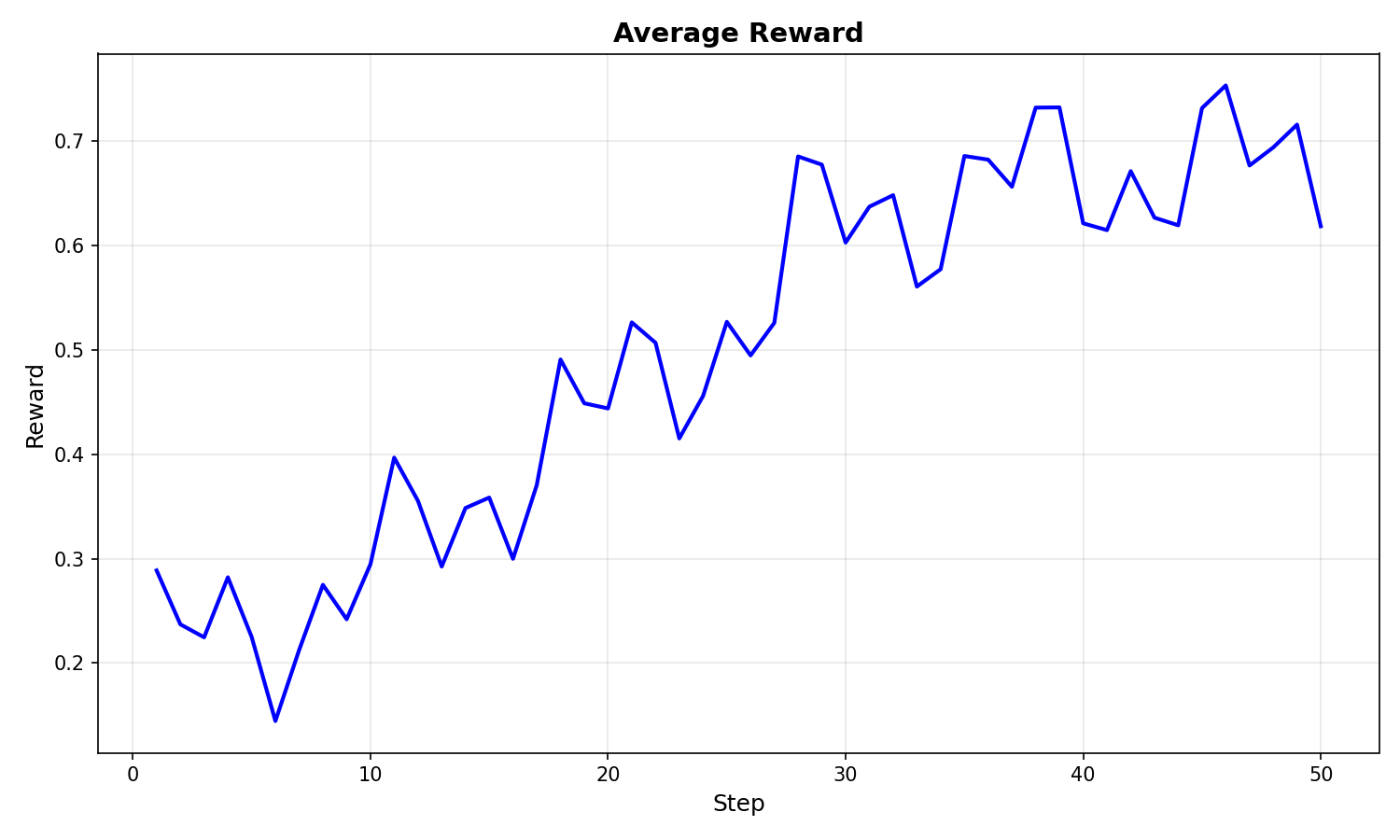
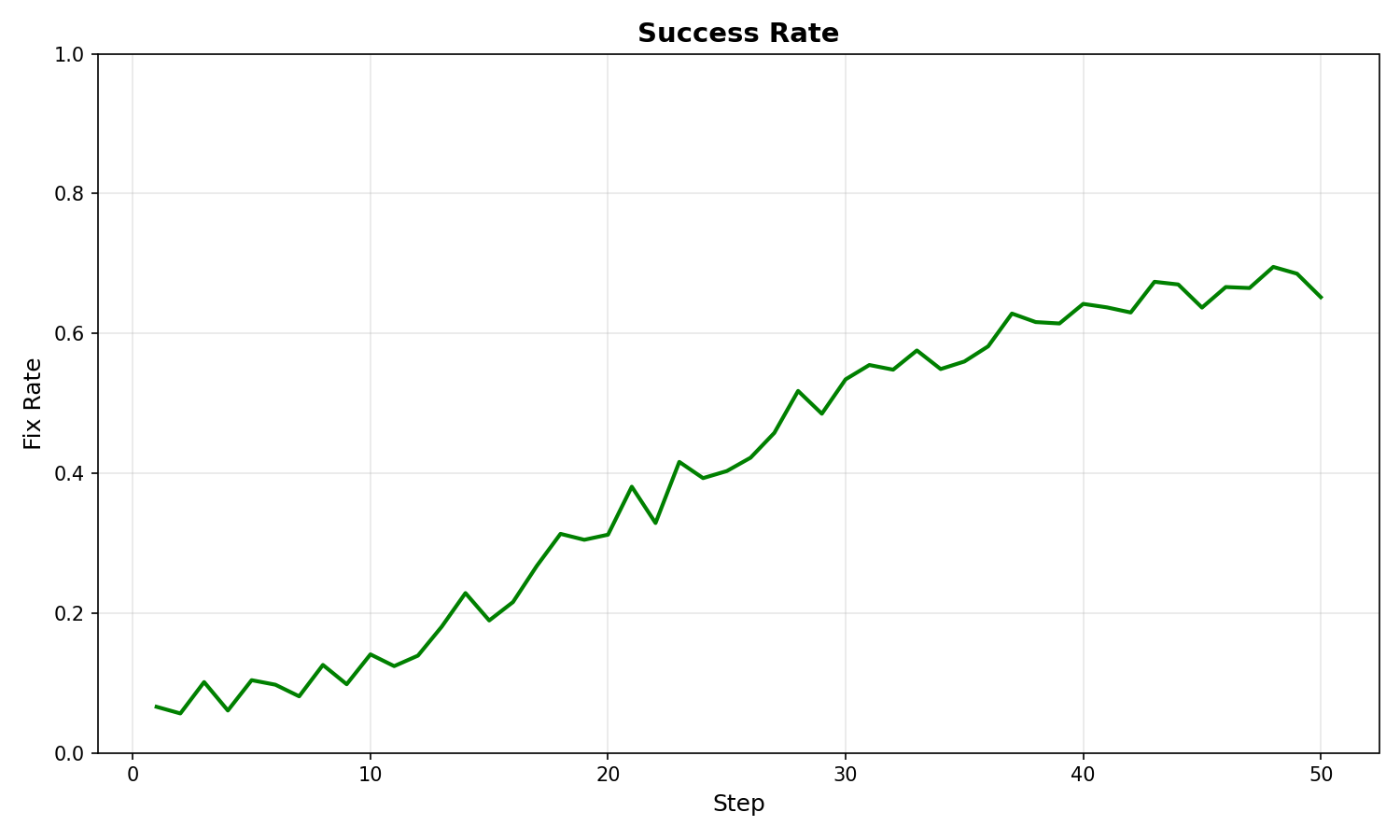
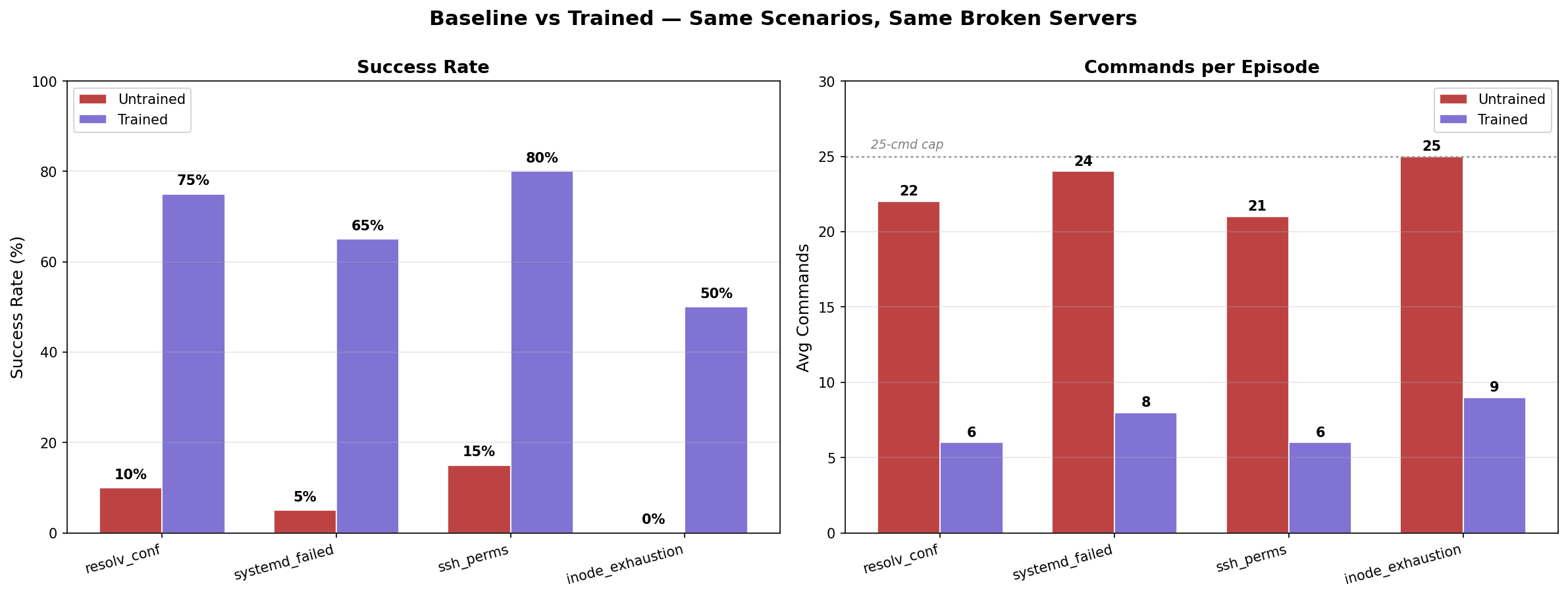
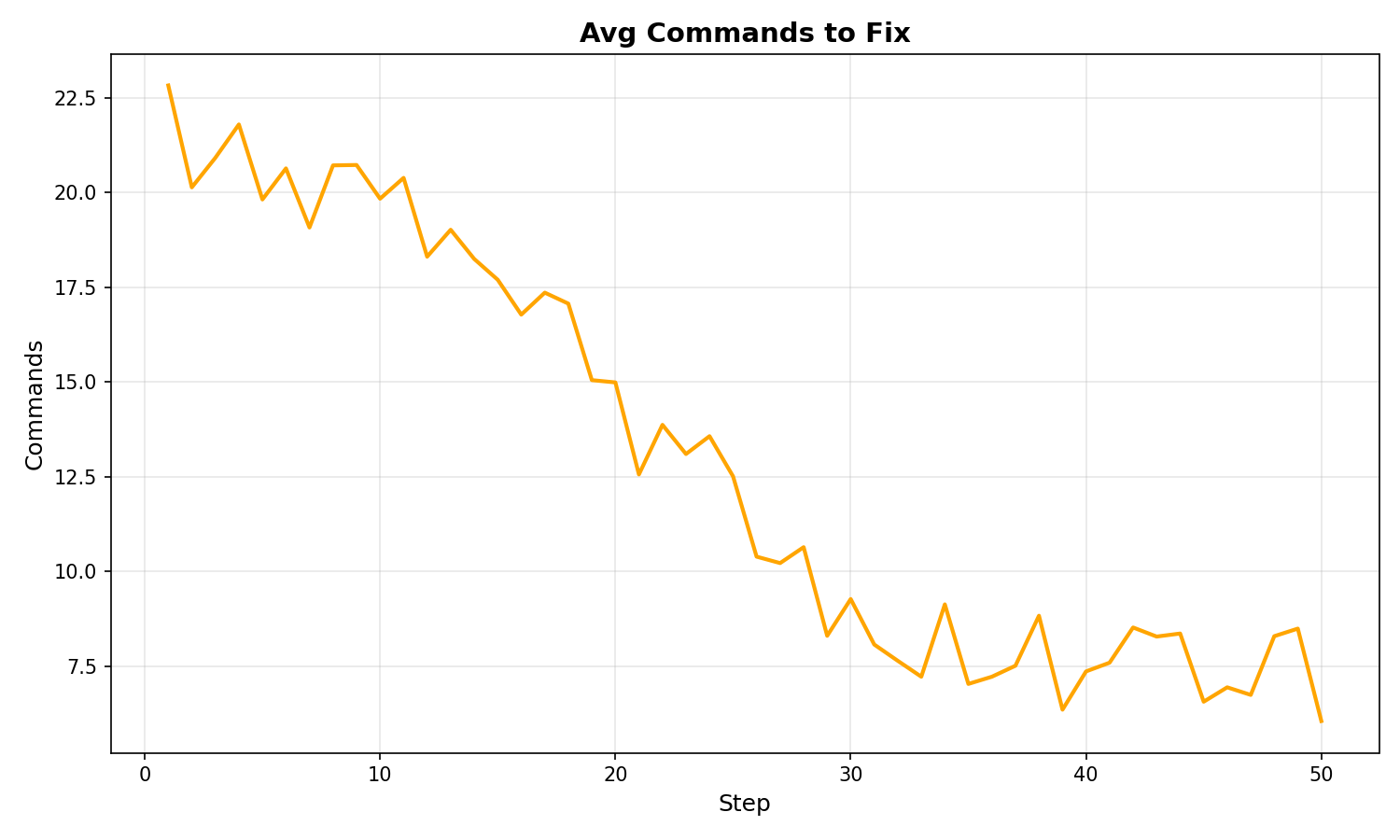
Qwen2.5-Coder-0.5B-Instruct · T4 GPU · 50 steps · 4 episodes/step · real Docker environment
Reward Curve
Average episode reward per training step. Upward trend = model learning to fix servers more efficiently.
Success Rate (Fix Rate)
Percentage of episodes where the model actually fixed the broken service. Measured on held-out scenarios not seen during training.
Baseline vs Trained
Side-by-side comparison of untrained model vs GRPO-trained model. Same scenarios, same broken servers.
Commands to Fix
Average number of commands needed to fix a scenario. Fewer = better.
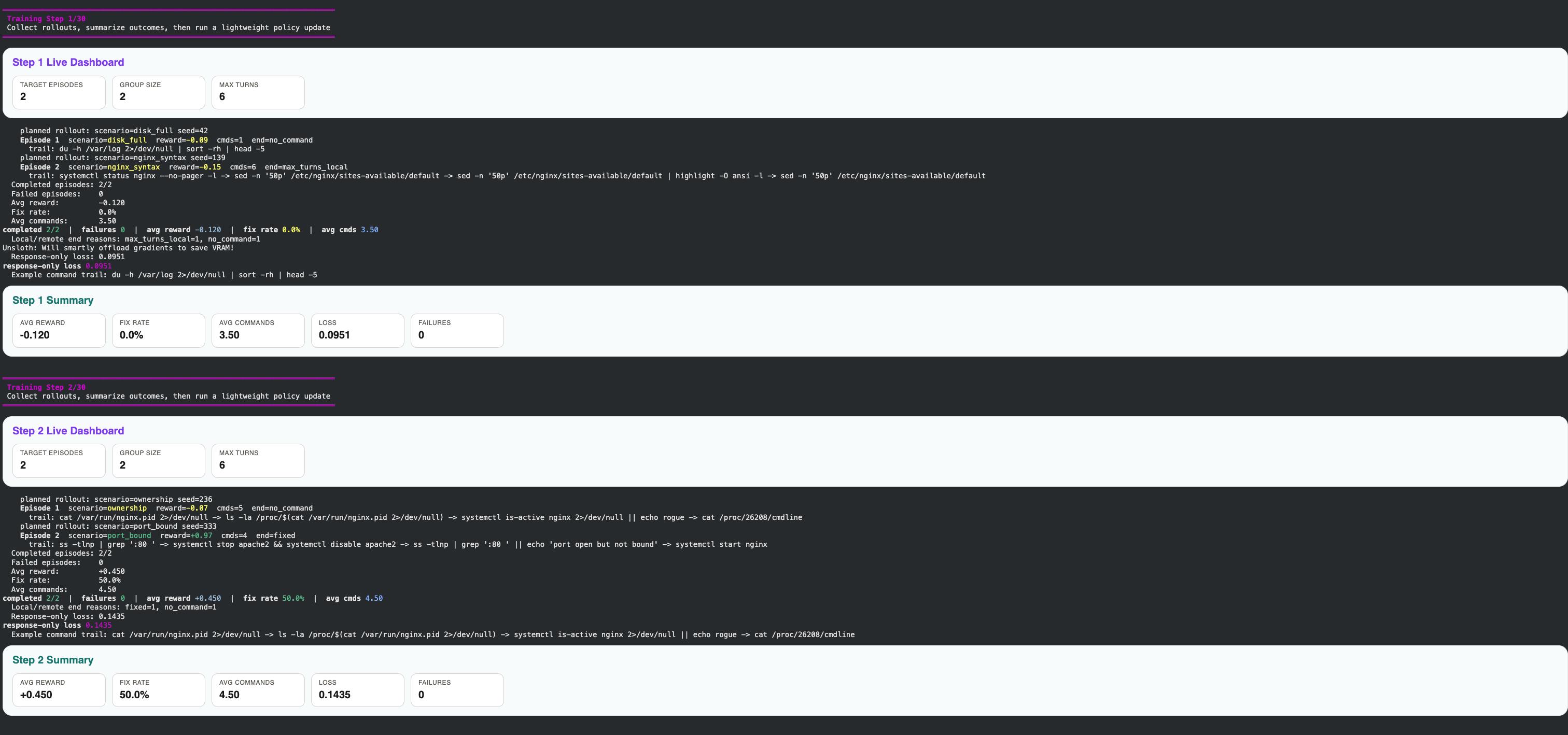
Live Training Log
The model learning in real time. Step 1: reward -0.12, fix rate 0%. Step 2: reward +0.45, fix rate 50%.
Numbers
8. Before vs After: What the Model Actually Says
Same scenario: "nginx won't start, address already in use."
Untrained model — guesses without checking:
<think>Let me check nginx configuration.</think>
<bash>cat /etc/nginx/nginx.conf</bash>

<think>The config looks fine. Let me restart nginx.</think>
<bash>systemctl restart nginx</bash>

<think>Let me try reinstalling nginx.</think>
<bash>apt-get install --reinstall nginx</bash>
Result: never fixed. Didn't check what was using the port. Just guessed and retried.
Trained model — diagnoses, then fixes:
<think>"Address already in use" means something else has port 80. Find it first.</think>
<bash>ss -tlnp | grep ':80'</bash>

<output>LISTEN 0 511 0.0.0.0:80  users:(("apache2",pid=288))</output>

<think>apache2 is holding port 80. Stop it, then start nginx.</think>
<bash>systemctl stop apache2 && systemctl start nginx</bash>

Fixed. apache2 was started and holding port 80. Stopped it, nginx now serving.
Result: fixed in 2 commands. Diagnosed before acting.
That's the difference. Not magic. Just: read the error, find the cause, fix the cause.
9. What We Got Wrong (and Fixed)
200+ containers left running. Every training episode creates a Docker container. We didn't clean them up properly. Fixed by adding cleanup_old_containers() to sandbox.py and running cleanup on server startup.
The 60-second timer started too early. We started the episode clock when the container was created, not when the first command ran. Container creation + systemd boot takes 10-30 seconds. Fixed by moving start_time to after break_system() completes.
Training continued after the episode was done. Fixed by adding a done field to State and checking it in both the environment and the server.
We were training on a fake environment. The initial Gradio UI had a SimulatedEnv class — pattern-matched commands against regex to fake rewards. Never connected to real Docker. Fixed by adding RealEnvHTTP and an env URL input to the UI.
Mac went to sleep during training. ngrok tunnel dies when Mac sleeps. Fix: caffeinate -i & before starting a run.
10. Why This Approach Scales
Most AI is trained on text that already exists. The model gets good at producing text that resembles what it saw. Useful, but it has a ceiling.
What we're doing is different. The AI gets better by trying things and seeing what happens. The training signal isn't "does this look right?" but "did this work?" That's a fundamentally different kind of feedback, and one that keeps scaling as long as we have problems with verifiable answers.
Servers are a good first test because the answer is so unambiguous. But the same idea works for anything with a clear success condition. Did the unit test pass? Did the program compile? Did the SQL query return the right rows?
We used a 0.5B parameter model — one of the smallest Qwen variants. It's not a powerful model. But give it a real environment and real feedback and it starts developing real instincts. That's the part that's interesting.
11. Try It Yourself
# 1. Build the sandbox image
docker build -f docker/sandbox.Dockerfile -t sysadmin-sandbox:latest .

# 2. Start the environment server
pip install -e .
python -m sysadmin_env.server.app

# 3. Run an episode
curl -X POST localhost:8000/reset \
  -H "Content-Type: application/json" \
  -d '{"scenario_id": "port_bound"}'

curl -X POST localhost:8000/step \
  -H "Content-Type: application/json" \
  -d '{"command": "ss -tlnp | grep :80"}'
The environment handles one command at a time. Hook up any LLM that can generate <bash>command</bash> formatted responses and it'll work.
Built for the OpenEnv hackathon. The environment is the submission. The trained model is the evidence.