
Belamana/hand_gestures
hand-gesture-recognition-using-mediapipe
Estimate hand pose using MediaPipe (Python version).<br> This is a sample program that recognizes hand signs and finger gestures with a simple MLP using the detected key points. <br> ❗ ️**This is English Translated version of the [original repo](https://github.com/Kazuhito00/hand-gesture-recognition-using-mediapipe). All Content is translated to english along with comments and notebooks** ❗ <br> 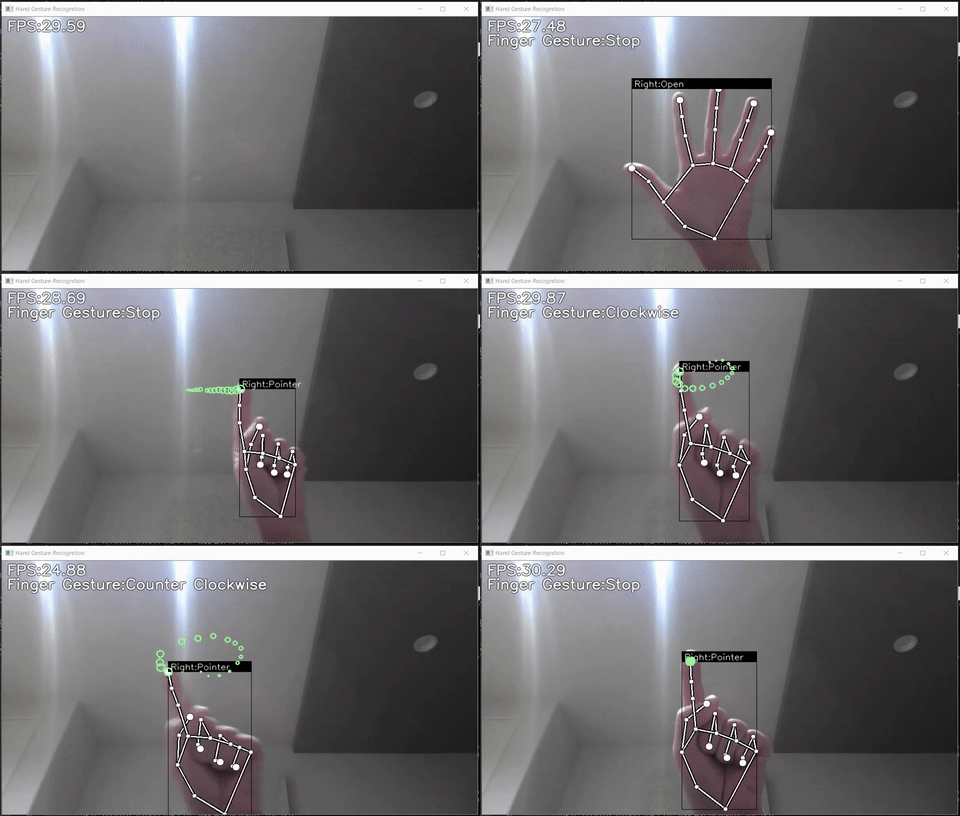
This repository contains the following contents.
- Sample program
- Hand sign recognition model(TFLite)
- Finger gesture recognition model(TFLite)
- Learning data for hand sign recognition and notebook for learning
- Learning data for finger gesture recognition and notebook for learning
Requirements
- mediapipe 0.8.1
- OpenCV 3.4.2 or Later
- Tensorflow 2.3.0 or Later<br>tf-nightly 2.5.0.dev or later (Only when creating a TFLite for an LSTM model)
- scikit-learn 0.23.2 or Later (Only if you want to display the confusion matrix)
- matplotlib 3.3.2 or Later (Only if you want to display the confusion matrix)
Demo
Here's how to run the demo using your webcam.
python app.pyThe following options can be specified when running the demo.
- --device<br>Specifying the camera device number (Default:0)
- --width<br>Width at the time of camera capture (Default:960)
- --height<br>Height at the time of camera capture (Default:540)
- --usestaticimagemode<br>Whether to use staticimage_mode option for MediaPipe inference (Default:Unspecified)
- --mindetectionconfidence<br> Detection confidence threshold (Default:0.5)
- --mintrackingconfidence<br> Tracking confidence threshold (Default:0.5)
Directory
<pre> │ app.py │ keypointclassification.ipynb │ pointhistoryclassification.ipynb │ ├─model │ ├─keypointclassifier │ │ │ keypoint.csv │ │ │ keypointclassifier.hdf5 │ │ │ keypointclassifier.py │ │ │ keypointclassifier.tflite │ │ └─ keypointclassifierlabel.csv │ │ │ └─pointhistoryclassifier │ │ pointhistory.csv │ │ pointhistoryclassifier.hdf5 │ │ pointhistoryclassifier.py │ │ pointhistoryclassifier.tflite │ └─ pointhistoryclassifier_label.csv │ └─utils └─cvfpscalc.py </pre>
app.py
This is a sample program for inference.<br> In addition, learning data (key points) for hand sign recognition,<br> You can also collect training data (index finger coordinate history) for finger gesture recognition.
keypoint_classification.ipynb
This is a model training script for hand sign recognition.
pointhistoryclassification.ipynb
This is a model training script for finger gesture recognition.
model/keypoint_classifier
This directory stores files related to hand sign recognition.<br> The following files are stored.
- Training data(keypoint.csv)
- Trained model(keypoint_classifier.tflite)
- Label data(keypointclassifierlabel.csv)
- Inference module(keypoint_classifier.py)
model/pointhistoryclassifier
This directory stores files related to finger gesture recognition.<br> The following files are stored.
- Training data(point_history.csv)
- Trained model(pointhistoryclassifier.tflite)
- Label data(pointhistoryclassifier_label.csv)
- Inference module(pointhistoryclassifier.py)
utils/cvfpscalc.py
This is a module for FPS measurement.
Training
Hand sign recognition and finger gesture recognition can add and change training data and retrain the model.
Hand sign recognition training
1.Learning data collection
Press "k" to enter the mode to save key points(displayed as 「MODE:Logging Key Point」)<br> <img src="https://user-images.githubusercontent.com/37477845/102235423-aa6cb680-3f35-11eb-8ebd-5d823e211447.jpg" width="60%"><br><br> If you press "0" to "9", the key points will be added to "model/keypoint_classifier/keypoint.csv" as shown below.<br> 1st column: Pressed number (used as class ID), 2nd and subsequent columns: Key point coordinates<br> <img src="https://user-images.githubusercontent.com/37477845/102345725-28d26280-3fe1-11eb-9eeb-8c938e3f625b.png" width="80%"><br><br> The key point coordinates are the ones that have undergone the following preprocessing up to ④.<br> <img src="https://user-images.githubusercontent.com/37477845/102242918-ed328c80-3f3d-11eb-907c-61ba05678d54.png" width="80%"> <img src="https://user-images.githubusercontent.com/37477845/102244114-418a3c00-3f3f-11eb-8eef-f658e5aa2d0d.png" width="80%"><br><br> In the initial state, three types of learning data are included: open hand (class ID: 0), close hand (class ID: 1), and pointing (class ID: 2).<br> If necessary, add 3 or later, or delete the existing data of csv to prepare the training data.<br> <img src="https://user-images.githubusercontent.com/37477845/102348846-d0519400-3fe5-11eb-8789-2e7daec65751.jpg" width="25%"> <img src="https://user-images.githubusercontent.com/37477845/102348855-d2b3ee00-3fe5-11eb-9c6d-b8924092a6d8.jpg" width="25%"> <img src="https://user-images.githubusercontent.com/37477845/102348861-d3e51b00-3fe5-11eb-8b07-adc08a48a760.jpg" width="25%">
2.Model training
Open "keypoint_classification.ipynb" in Jupyter Notebook and execute from top to bottom.<br> To change the number of training data classes, change the value of "NUMCLASSES = 3" <br>and modify the label of "model/keypointclassifier/keypointclassifierlabel.csv" as appropriate.<br><br>
X.Model structure
The image of the model prepared in "keypoint_classification.ipynb" is as follows. <img src="https://user-images.githubusercontent.com/37477845/102246723-69c76a00-3f42-11eb-8a4b-7c6b032b7e71.png" width="50%"><br><br>
Finger gesture recognition training
1.Learning data collection
Press "h" to enter the mode to save the history of fingertip coordinates (displayed as "MODE:Logging Point History").<br> <img src="https://user-images.githubusercontent.com/37477845/102249074-4d78fc80-3f45-11eb-9c1b-3eb975798871.jpg" width="60%"><br><br> If you press "0" to "9", the key points will be added to "model/pointhistoryclassifier/point_history.csv" as shown below.<br> 1st column: Pressed number (used as class ID), 2nd and subsequent columns: Coordinate history<br> <img src="https://user-images.githubusercontent.com/37477845/102345850-54ede380-3fe1-11eb-8d04-88e351445898.png" width="80%"><br><br> The key point coordinates are the ones that have undergone the following preprocessing up to ④.<br> <img src="https://user-images.githubusercontent.com/37477845/102244148-49e27700-3f3f-11eb-82e2-fc7de42b30fc.png" width="80%"><br><br> In the initial state, 4 types of learning data are included: stationary (class ID: 0), clockwise (class ID: 1), counterclockwise (class ID: 2), and moving (class ID: 4). <br> If necessary, add 5 or later, or delete the existing data of csv to prepare the training data.<br> <img src="https://user-images.githubusercontent.com/37477845/102350939-02b0c080-3fe9-11eb-94d8-54a3decdeebc.jpg" width="20%"> <img src="https://user-images.githubusercontent.com/37477845/102350945-05131a80-3fe9-11eb-904c-a1ec573a5c7d.jpg" width="20%"> <img src="https://user-images.githubusercontent.com/37477845/102350951-06444780-3fe9-11eb-98cc-91e352edc23c.jpg" width="20%"> <img src="https://user-images.githubusercontent.com/37477845/102350942-047a8400-3fe9-11eb-9103-dbf383e67bf5.jpg" width="20%">
2.Model training
Open "point_history_classification.ipynb" in Jupyter Notebook and execute from top to bottom.<br> To change the number of training data classes, change the value of "NUMCLASSES = 4" and <br>modify the label of "model/pointhistoryclassifier/pointhistoryclassifierlabel.csv" as appropriate. <br><br>
X.Model structure
The image of the model prepared in "point_history_classification.ipynb" is as follows. <img src="https://user-images.githubusercontent.com/37477845/102246771-7481ff00-3f42-11eb-8ddf-9e3cc30c5816.png" width="50%"><br> The model using "LSTM" is as follows. <br>Please change "use_lstm = False" to "True" when using (tf-nightly required (as of 2020/12/16))<br> <img src="https://user-images.githubusercontent.com/37477845/102246817-8368b180-3f42-11eb-9851-23a7b12467aa.png" width="60%">
Reference
Author
Kazuhito Takahashi(https://twitter.com/KzhtTkhs)
Translation and other improvements
Nikita Kiselov(https://github.com/kinivi)
License
hand-gesture-recognition-using-mediapipe is under Apache v2 license.